I transform complex infrastructure into secure, scalable solutions -
streamlining systems, automating workflows, and blending system
administration, DevOps, and cloud engineering to power the next
generation of business innovation.
My interest in technology started early when I saved up for my first
budget PC and learned how to build it myself. That hands-on experience
sparked a deeper interest in how systems work, how they fail, and how
they can be improved.
Over time, that curiosity grew into a career centered around
infrastructure, support, and backend systems. What began with fixing and
building machines evolved into designing environments that are stable,
secure, and built to last.
WHAT I DO
Keep systems running.
Infrastructure
I build, maintain, and improve the core systems organizations depend
on every day.
Automation
I streamline repetitive work and turn manual processes into
efficient workflows.
Cloud & Hybrid
I work across on-prem and cloud environments to keep systems
connected, stable, and scalable.
CORE STACK
Skills & Technologies
Platforms, tools, and languages I use across infrastructure, cloud,
automation, and development workflows.
KubernetesAzureAmazon Web ServicesGoogle WorkspaceJavaPythonLinuxJavaScriptTypeScriptShellBashDockerGoogle Cloud PlatformMicrosoft 365Terraform
# Live Azure API — first request may take a few seconds to wake
Demo Interaction Flow
The interactive window above demonstrates how a frontend application can
communicate with a deployed backend service. When a command is triggered,
the Astro frontend sends a request to the backend API running on Azure App
Service.
Cross-Origin Resource Sharing (CORS) rules allow the portfolio site to
securely communicate with the API, while environment-based configuration
in Azure App Service provides the connection settings required for the
application to reach its supporting services.
Project Overview
CloudLab is an Infrastructure as Code project built to demonstrate how a
complete Azure application environment can be provisioned and managed
through Terraform instead of being created manually in the Azure portal.
The project deploys the core cloud resources required to run a web
application, including resource groups, an App Service-hosted API,
database services, and the supporting configuration needed to connect them
together. This makes the environment reproducible, easier to maintain, and
suitable for real-world cloud deployment workflows.
During development the backend API was containerized with Docker to ensure
consistent behavior between local testing and cloud deployment. This
allows the application to be built, tested, and validated in a controlled
environment before being deployed to Azure infrastructure managed by
Terraform.
How It Works
Terraform acts as the source for the infrastructure. When the
configuration is applied, Azure resources are created and wired together
automatically. The frontend communicates with the deployed API, and the
API uses environment-based configuration to connect securely to its
supporting services.
Why It’s Impressive
Turns Azure infrastructure into version-controlled code instead of
manual portal configuration.
Demonstrates reproducible deployment practices using Terraform and the
AzureRM provider.
Shows understanding of cloud hosting, application configuration,
databases, and service connectivity.
Makes the environment easier to review, update, and redeploy as the
project grows.
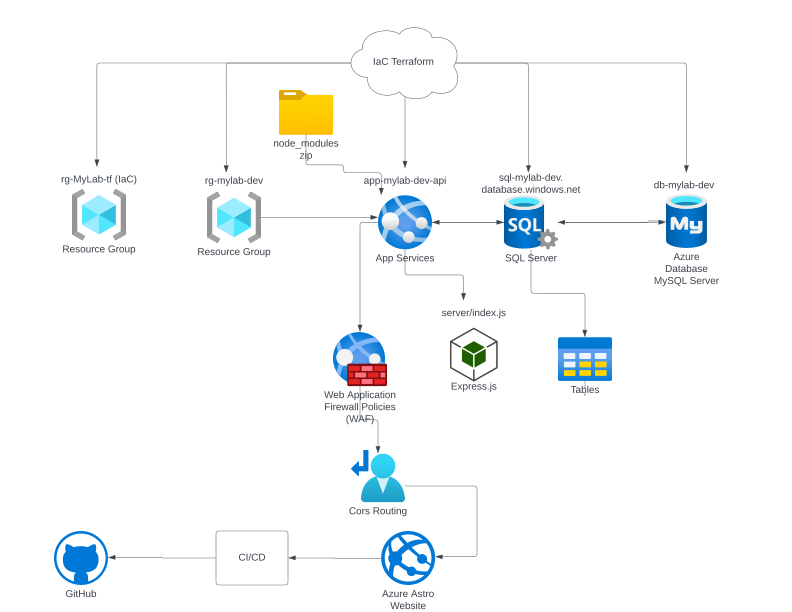
Architecture Visualization
The diagram below represents the Azure environment provisioned by
Terraform and shows how the application, database, and supporting cloud
resources fit together.
Terraform-defined Azure infrastructure for the CloudLab application stack.
I built a full-stack DevOps monitoring platform designed to simulate and
visualize real-world infrastructure behavior, including service health,
traffic patterns, system metrics, and Kubernetes-style autoscaling.
The system uses a React (Vite) frontend and a
FastAPI backend deployed to Azure, with full
CI/CD pipelines through GitHub Actions.
It is designed to operate in two modes: a
cost-efficient Azure Container Apps deployment used now, and
a
future-ready AKS path for a true Kubernetes-native runtime
later.
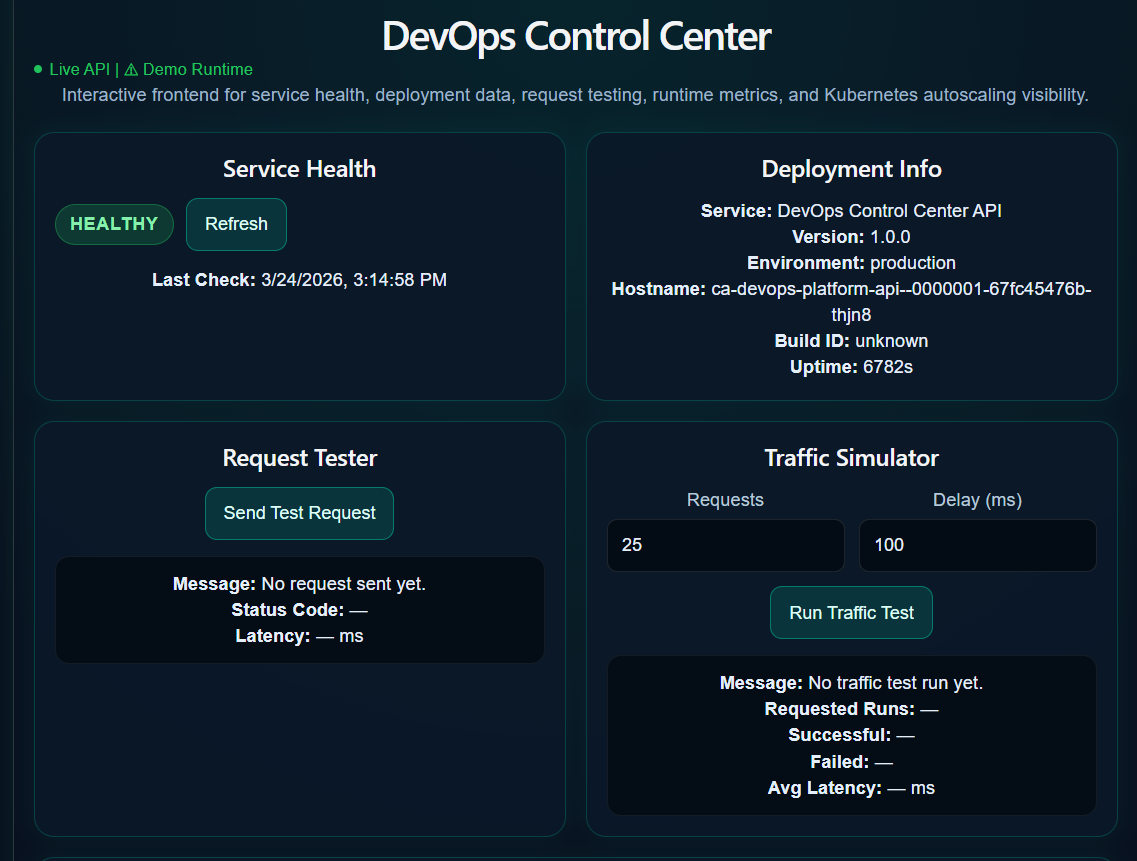
Live Dashboard Preview
The live dashboard is hosted in Azure and showcases service health,
deployment info, request testing, traffic simulation, live metrics,
charts, and a Kubernetes-style runtime layer.
Service Health Monitoring: Checks API availability through
/health and displays uptime and service state.
Deployment Metadata: Shows runtime environment details such
as version, hostname, and uptime for debugging and verification.
Request Testing + Traffic Simulation: Sends real API requests
with configurable request counts and delay intervals, then tracks success,
failure, and latency.
Metrics Dashboard: Displays total requests, average latency,
and failure rate with real-time updates.
Live Charts: Visualizes request latency, CPU usage, and replica
trends.
Kubernetes Runtime Layer: Displays pod-style runtime data,
autoscaling behavior, and replica activity in a Kubernetes-inspired view.
Demo Mode
Because the current deployment runs on Azure Container Apps rather than a live AKS cluster, the Kubernetes runtime
layer operates in a fallback demo mode.
cluster_connected = false
Runtime visuals fall back to simulated pod and autoscaling data
The UI still demonstrates realistic CPU usage, replica behavior, and
HPA-style scaling
This keeps the platform interactive and visually realistic while staying
low-cost and preserving an AKS-ready architecture.
Cloud & DevOps Implementation
Frontend Hosting: Deployed through
Azure Static Web Apps with automatic CI/CD on push.
Backend Hosting: Runs as a Dockerized
FastAPI service in Azure Container Apps.
Container Registry: Images are stored in
Azure Container Registry (ACR).
Authentication & Secrets: GitHub Actions uses an
Azure service principal and
GitHub Secrets for secure deployment.
Key Engineering Decisions
Cost Optimization: Used Azure Container Apps instead of AKS
to avoid full cluster overhead while still demonstrating cloud-native deployment
patterns.
Demo Mode Design: Built a simulated Kubernetes fallback layer
so the interface could still showcase advanced runtime concepts without requiring
a live cluster.
Environment Configuration: Used VITE_API_BASE_URL to manage frontend-to-backend communication and handled build-time versus
runtime environment differences.
Security Awareness: Kept secrets out of the frontend and
used GitHub Secrets plus Azure authentication for deployment automation.
Why This Project Matters
This project demonstrates my ability to design, build, and deploy a
full-stack cloud-native system using real DevOps practices, including
CI/CD, containerization, Azure deployment, observability, environment
management, and scalable architecture planning.
CI/CD AutoForge AI
self-deploying GPT backend
AutoForge — GPT Backend & Azure CI/CD
FastAPI on Azure · GitHub Actions · Service Principal Auth · Docker
# Live API endpoint — first request may take a few seconds to wake
# Rate-limited to 3 requests per hour per IP
Demo Interaction Flow
When a user submits a prompt in the terminal above, the Astro frontend
sends a POST request to the AutoForge API endpoint (/ai/chat). The FastAPI backend forwards the request to Azure OpenAI and returns
the generated response, which is then rendered in the terminal interface.
CORS rules allow the portfolio site to communicate securely with the
backend while API keys and deployment configuration are stored as
environment variables in Azure App Service.
Project Overview
AutoForge AI is a cloud-deployed AI backend platform designed to
demonstrate how modern applications integrate AI services with automated
DevOps pipelines. The system exposes a FastAPI endpoint that forwards
prompts to Azure OpenAI, allowing the portfolio site to interact with a
live AI service.
The focus of this project is not just the AI integration but the
infrastructure and deployment workflow behind it. Every change pushed to
GitHub automatically builds, tests, and deploys the backend to Azure App
Service using a CI/CD pipeline.
How It Works
AutoForge begins at the Astro frontend, where the user submits a prompt
through the terminal interface. That request is sent to a FastAPI backend
hosted on Azure App Service.
The backend validates the request, loads its configuration from Azure App
Service environment variables, and forwards the prompt to Azure OpenAI.
The generated response is then returned to the frontend and rendered back
into the terminal UI.
During development and CI, Docker is used to keep the application behavior
consistent across local testing, automated validation, and deployment
workflows.
Why It’s Impressive
Combines AI integration, cloud hosting, and CI/CD automation into a
single working platform.
Uses GitHub Actions and Azure authentication through a Service Principal
instead of relying on older publish-profile deployment methods.
Demonstrates containerized development and testing with Docker for more
consistent environments.
Shows secure configuration practices through CORS rules, Azure App
Settings, and GitHub Secrets.
Turns the portfolio itself into a live frontend client for a deployed AI
backend.
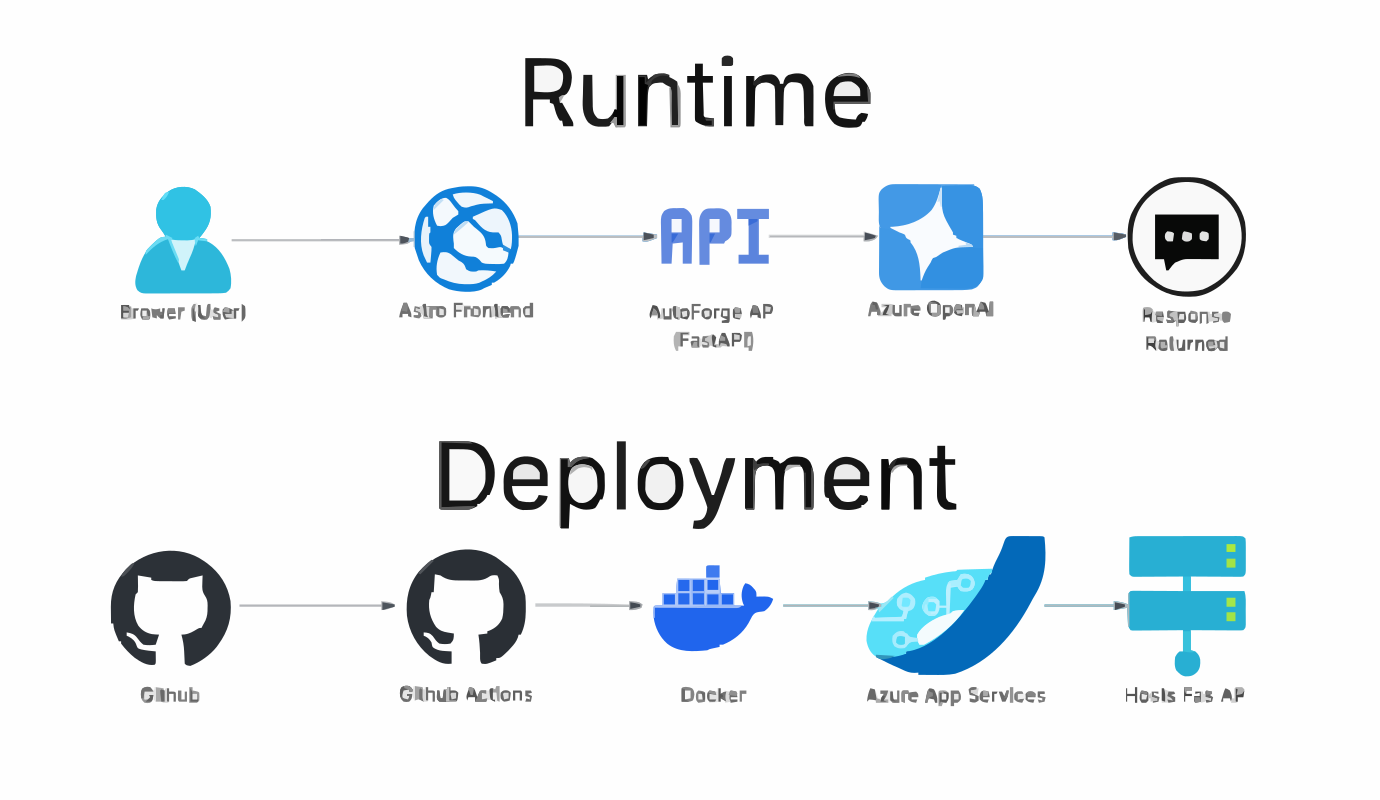
Architecture Visualization
The sketch below shows how prompts move from the Astro frontend to the
FastAPI backend, through Azure OpenAI, and back to the user, while GitHub
Actions handles automated deployment to Azure App Service.
Runtime request flow and CI/CD deployment pipeline for the AutoForge AI
backend.
AWS Secure Enterprise Portal
Live AWS EC2 + private PostgresSQL RDS demo
AWS Secure Enterprise Portal
EC2 · PostgreSQL RDS · VPC · Security Groups
Live AWS Backend
AWS LIVE DEMO
AWS Secure Enterprise Portal
Live EC2-hosted API connected to private PostgreSQL RDS through AWS security groups.
User→EC2 API→Private RDS
API StatusCHECKING
DatabaseCHECKING
Assets0
Open Tickets0
Managed Assets
Service Tickets
Project Overview
AWS Secure Enterprise Portal is a cloud-hosted internal business platform
demo built on Amazon EC2 and PostgreSQL RDS. The project demonstrates a
real web API hosted on AWS, connected to a private database through
controlled security group access.
The portal exposes live asset and ticket data from PostgreSQL, allowing my
portfolio frontend to query a real AWS backend instead of static mock
data.
Architecture
The current cost-optimized version uses a public EC2 instance for the Node
API and a private RDS PostgreSQL database. The database is not publicly
accessible; only the EC2 security group is allowed to connect on port
5432.
The production-style version of this architecture can be expanded with an
Application Load Balancer, AWS WAF, and EC2 Auto Scaling. Those components
were planned as the enterprise layer, while the current live version keeps
costs low for portfolio hosting.
User→WAF→ALB→Auto Scaling EC2→RDS
Why It’s Impressive
Built a custom AWS VPC with public and private subnet design.
Deployed a live Node.js API on EC2 using PM2 for process management.
Connected EC2 securely to private PostgreSQL RDS.
Configured security groups so the database is not exposed publicly.
Designed an enterprise-ready upgrade path using ALB, WAF, and Auto
Scaling.
01{}AZSECCLFNET102</>
Certifications
Vendor-verified credentials across cloud, security, networking,
endpoint administration, and DevOps.
0Certifications
0Vendors
Vendor Distribution
5 vendors
CompTIA
4
Microsoft
7
Cisco
1
Amazon
1
Fortinet
4
Credential Library
17 shown
CompTIA Active
ITF+ (CompTIA IT Fundamentals)
Foundational IT concepts: hardware, software, security, troubleshooting, databases, and basic programming.
FoundationsSupport
CompTIA Active
A+ (Core 1 & Core 2)
Support, OS, networking, hardware, and troubleshooting skills for technical roles.
SupportNetworking
CompTIA Active
Network+
Network design, configuration, routing/switching, wireless, security, and troubleshooting.
NetworkingSecurity
CompTIA Active
Security+
Core security principles, risk management, identity, cloud, and incident response.
SecurityCloud
Microsoft Active
AZ-900 — Azure Fundamentals
Azure core services, governance, security, pricing, and cloud concepts.
CloudMicrosoft
Microsoft Active
AZ-104 — Azure Administrator Associate
Identity, governance, storage, compute, networking in Azure with automation focus.
CloudMicrosoftAdministration
Microsoft Active
AZ-400 — DevOps Engineer Expert
CI/CD, source control, infrastructure as code, and release strategies in Azure DevOps.
DevOpsMicrosoftCloud
Microsoft Active
AZ-204 — Developing Solutions for Microsoft Azure
Building, testing, deploying, and maintaining cloud applications and services on Azure.
CloudMicrosoftDevelopment
Microsoft Active
AZ-305 — Azure Solutions Architect Expert
Designing secure, scalable, and reliable cloud solutions across Azure architecture domains.
CloudMicrosoftArchitecture
Microsoft Active
MD-102 — Endpoint Administrator
Windows deployment, Intune/UEM, policy, security baselines, and app lifecycle.
MicrosoftSecurityAdministration
Microsoft Active
MS-102 — Microsoft 365 Administrator
Tenant management, identity, security, compliance, and modern workplace administration.
MicrosoftSecurityAdministration
Cisco Active
CCNA — Cisco Certified Network Associate
Networking fundamentals, IP services, security, automation, and programmability.
NetworkingSecurity
Amazon Active
AWS Certified Cloud Practitioner (CLF-C02)
Cloud concepts, AWS services, security, pricing, and support at a foundational level.
CloudAWS
Fortinet Active
Fortinet NSE 1 - Certified in Cybersecurity
Entry-level cybersecurity and cloud fundamentals, including threat awareness and core security concepts.
SecurityCloudFoundations
Fortinet Active
Fortinet NSE 2 - Certified in Cybersecurity
Next-generation firewall fundamentals and Fortinet security product concepts for network protection.
SecurityNetworkingFirewall
Fortinet Active
Fortinet NSE 3 - Certified in Cybersecurity
FortiGate operator skills for common firewall features, network hardening, and day-to-day security operations.
SecurityNetworkingFirewall
Fortinet Active
Fortinet NSE 4 - Certified in FortiOS
FortiOS administration for configuring, operating, and troubleshooting FortiGate firewall solutions.